ChatGPT: Chrome Tab Control and New AI Features
ChatGPT is gaining deeper integration with Google Chrome, reading the content of open tabs and taking actions within them.

ChatGPT is gaining deeper integration with Google Chrome, as OpenAI announced features that allow the assistant to use the content of open tabs and, in some cases, control them. The change turns the ChatGPT extension from a simple conversational tool into an assistant that can work within the browser environment.
The new version of the extension is available in the Chrome Web Store. OpenAI introduced the capabilities in a thread on Twitter/X, explaining that ChatGPT can now see the tabs the user has open and use that context to answer questions or complete tasks.
Access to tab content is the first practical layer of the change. If, for example, several pages about a topic are open, ChatGPT can respond using that context without the user having to manually transfer information into the conversation.
Read also: OpenAI confirms a ChatGPT outage with sign-in and registration failures on August 19
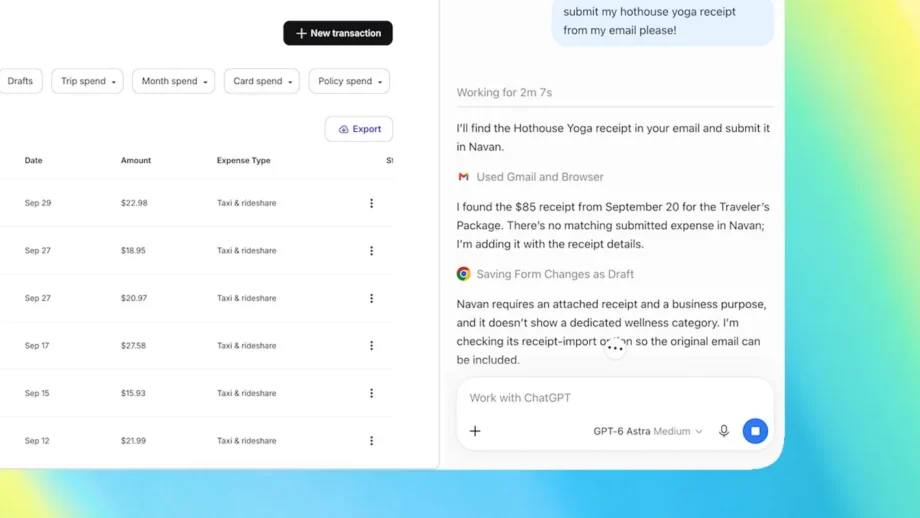
However, the integration is not limited to reading. According to OpenAI’s description, ChatGPT can control Chrome tabs to send messages, fill out forms, and download files. These are actions that move the assistant from text generation to executing steps within web pages.
The capabilities also include organizing open tabs and creating groups. This addresses a very specific Chrome problem: the accumulation of dozens of pages left open, which makes it difficult to find the right information.
The experience is also available through a sidebar, so ChatGPT can remain accessible without necessarily opening a separate window. The design resembles Gemini’s integration in Chrome, suggesting that the two companies are moving toward a similar browser-based assistant model.
The most interesting element is that OpenAI is not simply presenting a chatbot with access to more data, but a tool that can connect content understanding and action. Even so, the announcement does not clarify the limits of control, the confirmation requirements before sensitive actions, or which websites are fully supported.
The ChatGPT extension is already available in the Chrome Web Store, while the demo videos show the feature in action. The open question is no longer whether ChatGPT can use tabs, but how reliably and with how much control it will carry out actions within them.
The article’s writing was supported by AI tools and the content was reviewed according to TechitNews editorial policy.




0 reader comments
Share your view and continue the conversation.